How to File Assets and Liabilities Statement in IFHRMS (Step by Step Guide 2026)
All Tamil Nadu government employees must now file their Assets and Liabilities statement online through IFHRMS. The last date for this year is 31 October 2026.
In this guide, you will learn how to fill Form I, Form II and Form III in the IFHRMS portal or the Kalanjiyam app, step by step, in simple words. Every field is explained with an example.
Who Must File?
As per the Government letter from the Human Resources Management (A) Department dated 05.08.2026, every Tamil Nadu government employee must file, except All India Service officers (IAS, IPS, IFS).
What is the Last Date?
| Statement for the year | Last date to file |
|---|---|
| Calendar year 2025 (up to 31.12.2025) | 31 October 2026 |
| Calendar year 2026 (up to 31.12.2026) | 31 March 2027 |
| Every year after that | 31 March of the next year |
Why is it Important?
- The date you file will be mentioned in your Annual Confidential Report (ACR).
- Filing will be considered during promotion panel preparation.
- Not filing on time is treated as a violation of the Tamil Nadu Government Servants' Conduct Rules, 1973.
Documents to Keep Ready
Keep these with you before you start. Then you can finish in about 10 to 15 minutes.
- Land or house: Patta and sale deed (for survey number, date and value)
- Permission order: Copy of the sanction order, if you took office permission to buy property
- Vehicle: RC book
- Gold, bank deposits, shares: Approximate value and bank details
- Loans: Bank loan statement (loan amount, amount repaid, balance)
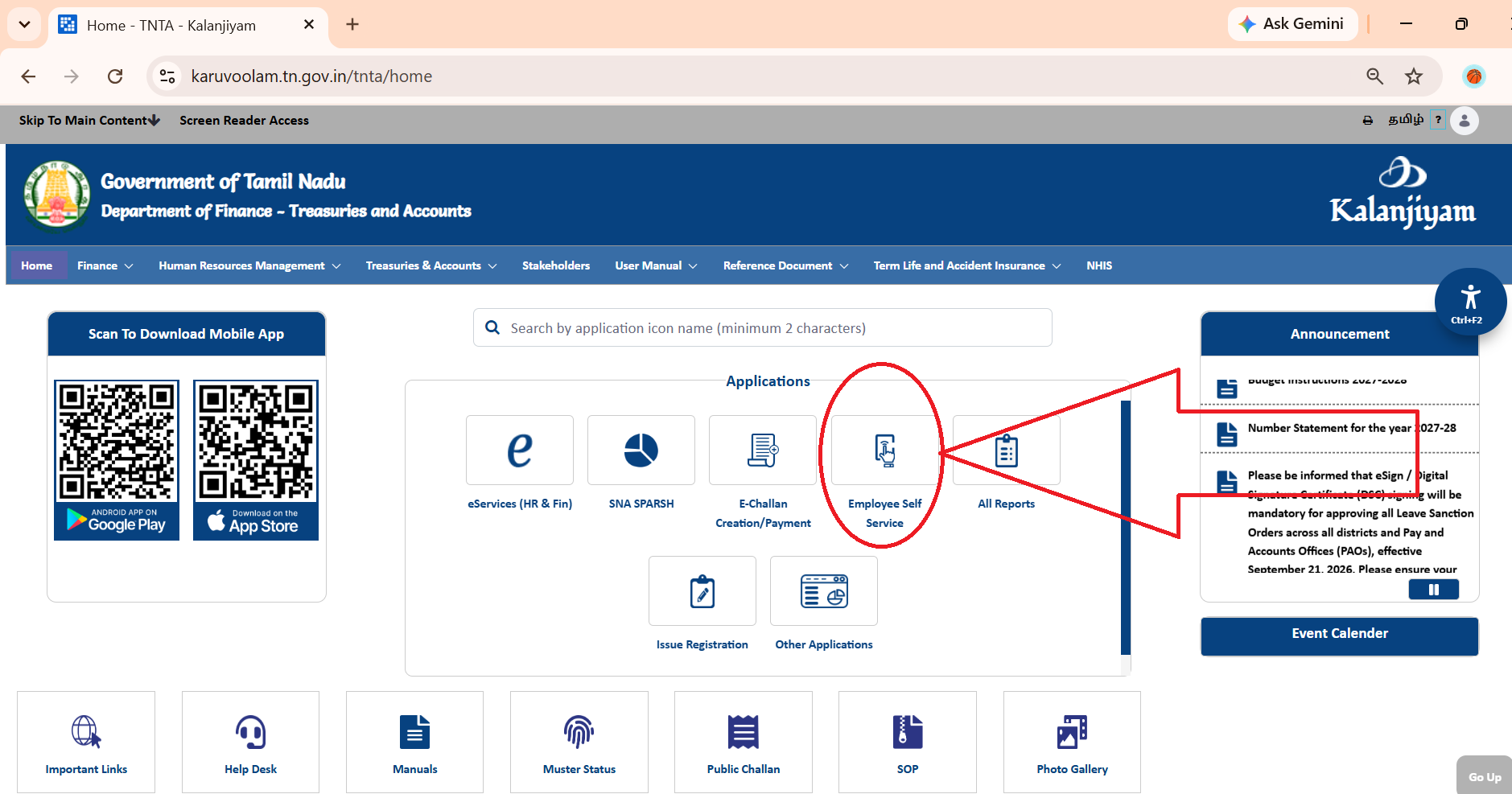
Step 1: Log in and Open Property Filing
- Open the IFHRMS web portal or the Kalanjiyam mobile app.
- Log in with your IFHRMS ID and password. Never share your ID or password with anyone.
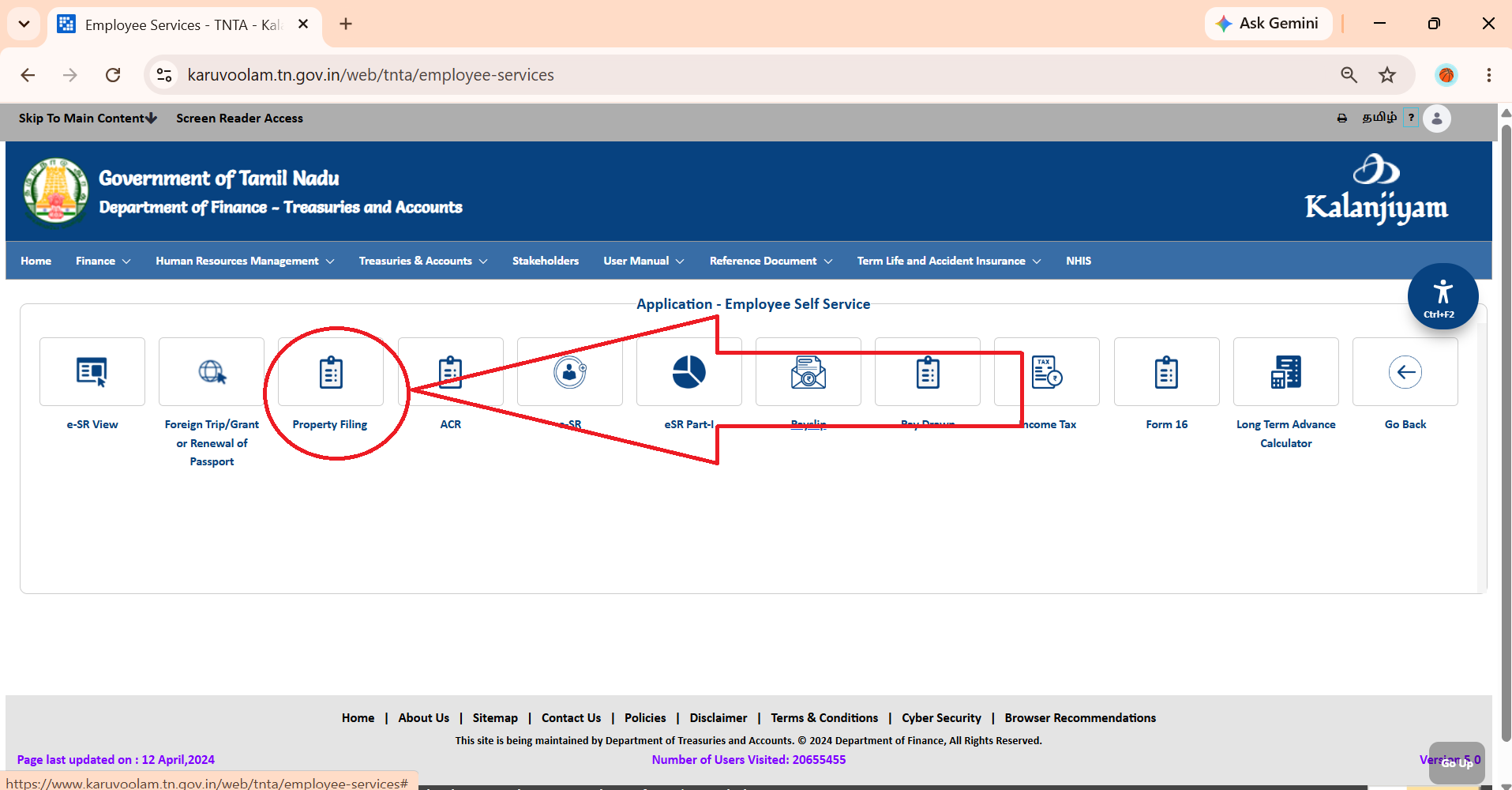
- Go to Employee Self Service.
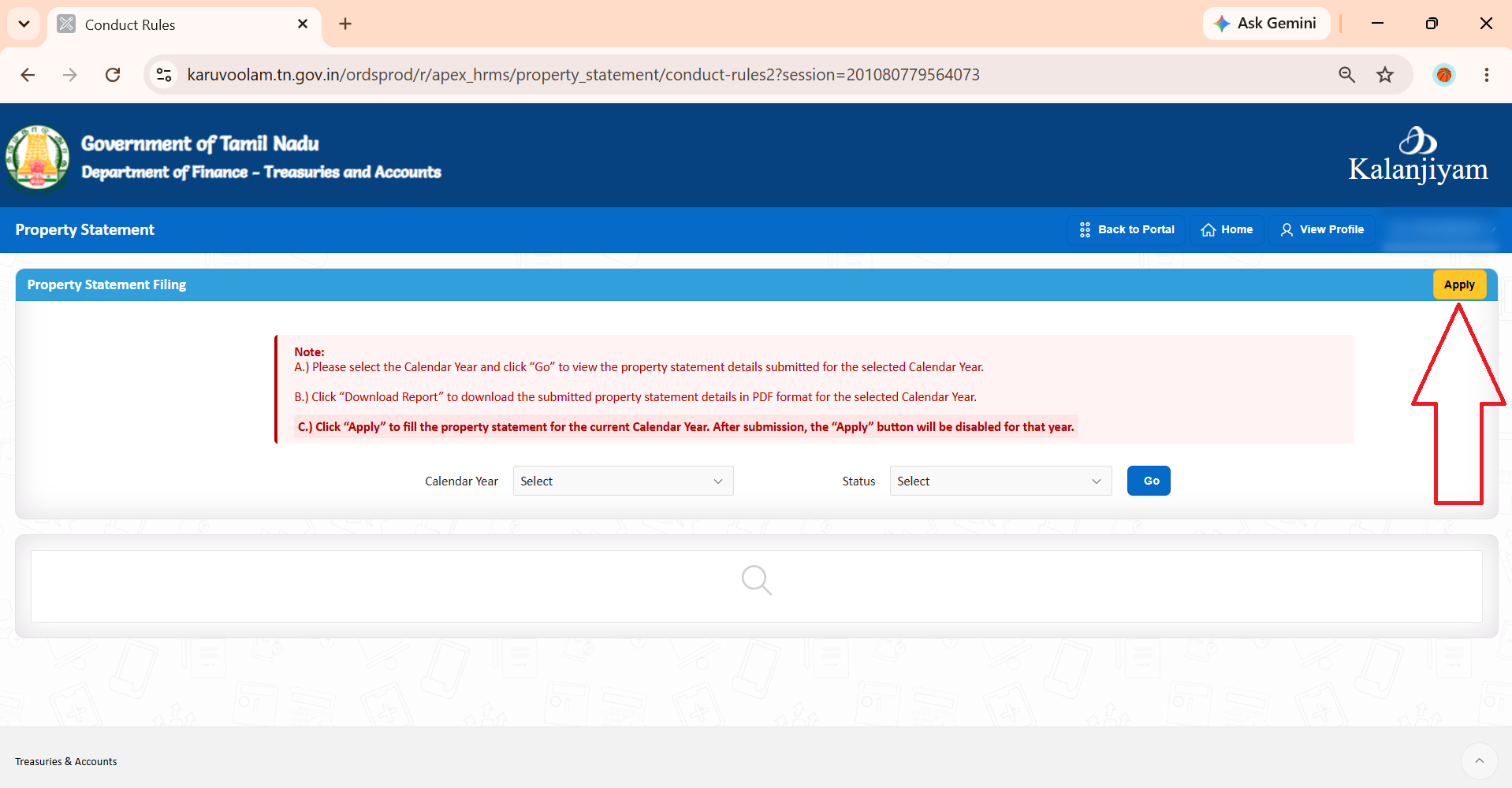
- Tap Property Filing, then Apply.
You will see three forms:
| Form | What it covers |
|---|---|
| Form I | Immovable property – land, house, flat |
| Form II | Movable property – vehicle, gold, bank deposits, shares |
| Form III | Debts and liabilities – loans |
Let us fill them one by one. The examples below use dummy data. Enter your own real details.
Step 2: Fill Form I – Immovable Property
In Form I, add each land, house or flat you own. If you have more than one property, add each one separately.
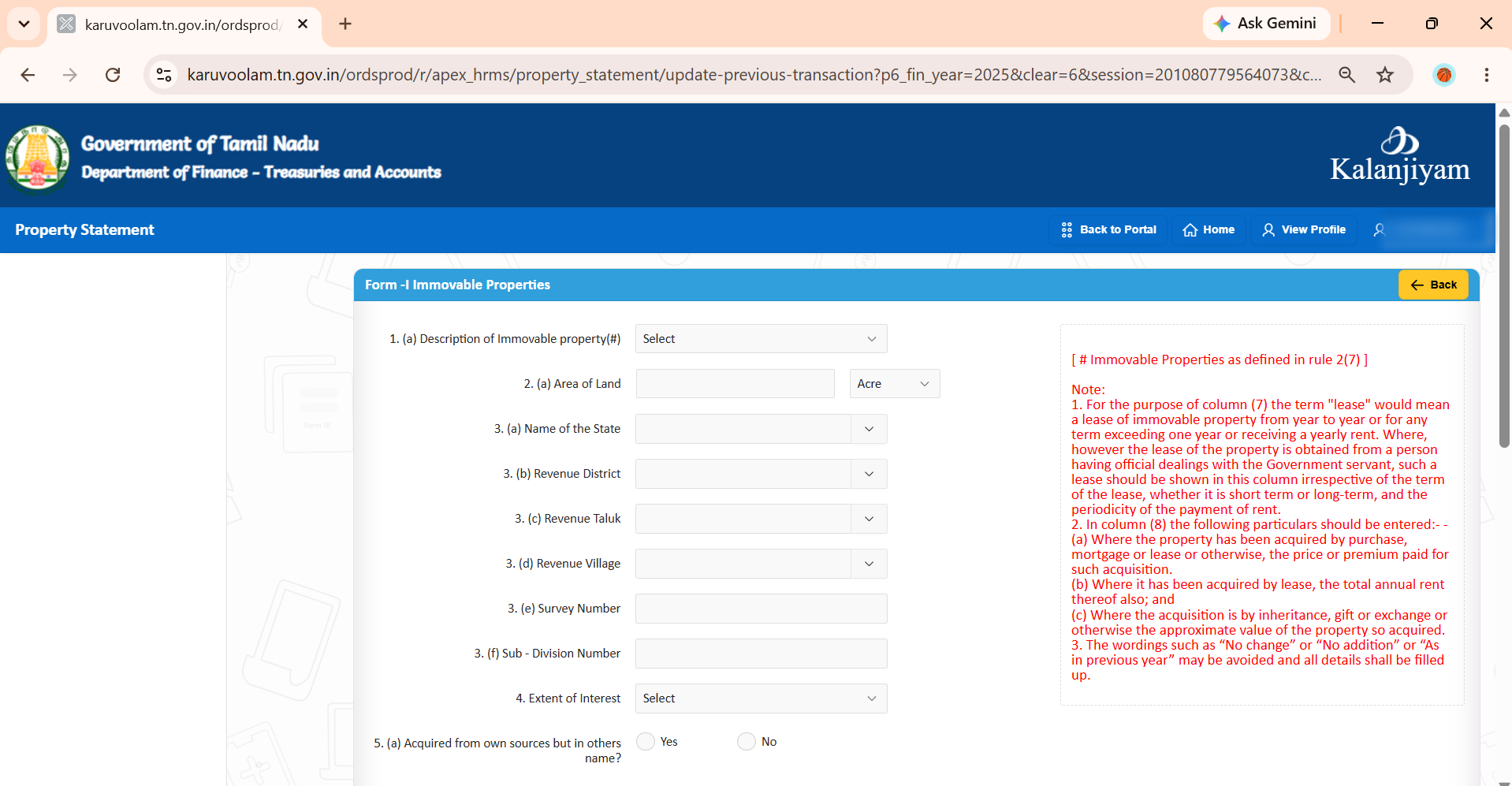
| Field | What it means | Example |
|---|---|---|
| Description of Immovable property | Type of property | Agricultural land / House / Flat |
| State, District, Taluk, Village | Where the property is | Tamil Nadu, Coimbatore, (your taluk), (your village) |
| Survey Number | Land number on the patta | 123 |
| Sub-Division Number | The part after the survey number | If patta shows 123/2A, type 2A |
| Extent of Interest | Your share in the property | Full / 100%, or 50% if joint |
| Acquired from own sources but in others name? | Did you pay, but register it in someone else's name? | Your own name → No |
| Date of Acquisition | Date you got the property | Registration date on the sale deed |
| Mode of Acquisition | How you got it | Purchase / Inheritance / Gift / Lease / Partition |
| Name and Address of the Person | Who you got it from | Seller's name and address from the sale deed |
| Connection with Govt Servant | Is that person your relative? | None / Father |
| Value of the Property | Price paid (see rules below) | 15,00,000 |
| Sources of Income | Where the money came from | Salary savings and SBI housing loan |
| Particulars of sanction & prescribed authority | Office permission details for buying the property | Proceedings No., date, authority name. If not needed, Not applicable |
| Total Annual income from the property | Yearly income, like rent | 6,000 |
| Remarks | Any extra note | Optional |
• Bought, mortgaged or leased → enter the price you paid.
• Leased → also enter the total yearly rent.
• Inheritance, gift or exchange → enter the approximate value.
• Show a lease if it is for more than one year, renews every year, or has yearly rent. If you took the lease from someone who has official dealings with you, show it always.
When done, Click Review.
Step 3: Fill Form II – Movable Property
In Form II, add your vehicles, gold, bank deposits, shares and other movable items. Add each item separately.
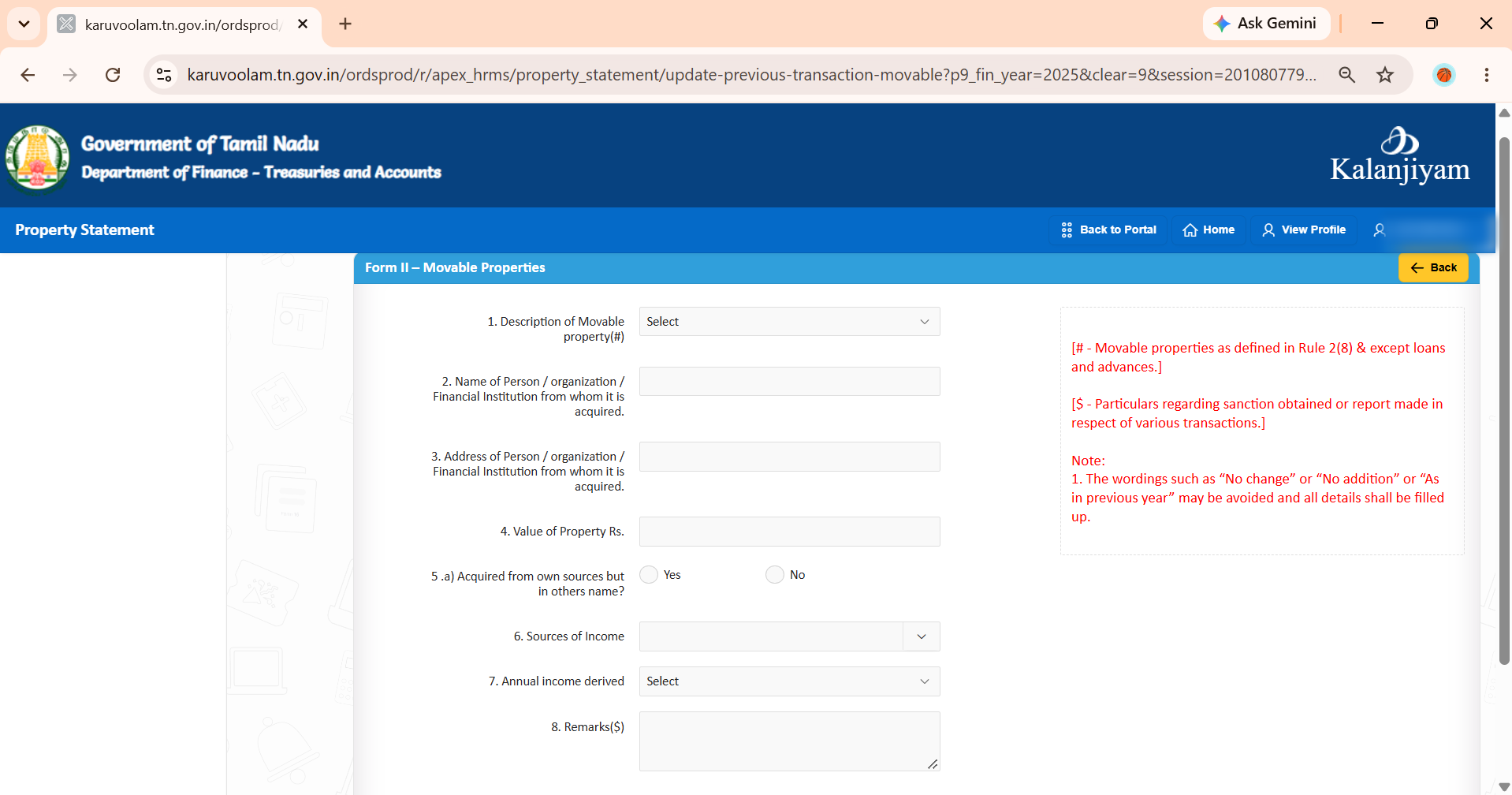
| Field | What it means | Example |
|---|---|---|
| Description of Movable property | Choose the type from the list | Vehicle-Two wheeler |
| Name of Person / Organisation / Financial Institution | Who you got it from | Showroom, jewellery shop or bank name |
| Address | Their address | Showroom address |
| Value of Property (Rs.) | Price paid, or balance for deposits | 85,000 |
| Acquired from own sources but in others name? | Your money, but in someone else's name? | No |
| Sources of Income | Where the money came from | Salary savings |
| Annual income derived | Choose the income type | Fixed deposit → Interest. Vehicle or gold → no income |
| Remarks | Details of office permission, if any | Proceedings No. and date |
Options in the Description list: Bank Balance, Bond, Cash, Fixed Deposits, Jewellery, Loans and Advances, Securities, Shares, Vehicle-Four wheeler, Vehicle-Two wheeler, Others.
When done, tap Review.
Step 4: Fill Form III – Debts and Other Liabilities
In Form III, add each loan you have taken. Keep your bank loan statement next to you.
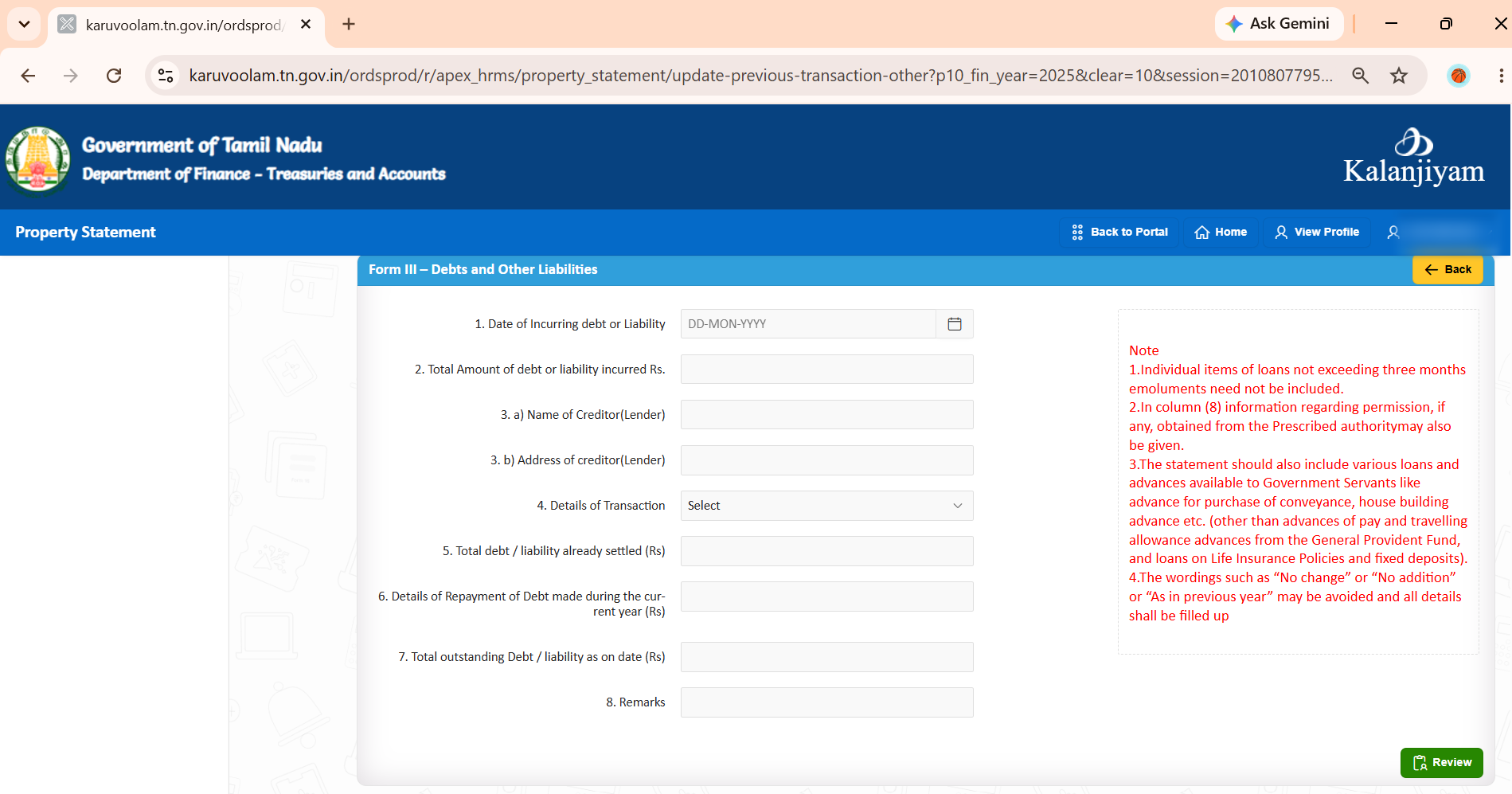
| Field | What it means | Example |
|---|---|---|
| Date of Incurring debt | Date the loan was sanctioned | 10.06.2020 |
| Total Amount of debt (Rs.) | Full loan amount | 10,00,000 |
| Name of Creditor (Lender) | Who gave the loan | State Bank of India |
| Address of Creditor | Lender's address | Bank branch address |
| Details of Transaction | How you received the money | Cash, Cheque, Digital Payment, Online, Others |
| Total debt already settled (Rs.) | Total amount repaid so far | 3,20,000 |
| Repayment made during the current year (Rs.) | Amount repaid in that year | 1,20,000 |
| Total outstanding debt as on date (Rs.) | Balance still to pay | 6,80,000 |
| Remarks | Office permission details, if any | Optional |
Which Loans to Include?
| Include | Do NOT include |
|---|---|
| Home loan, personal loan, vehicle loan from banks | Loans smaller than your 3 months' salary |
| Government advances like house building advance and conveyance (vehicle) advance | Pay advance and travelling allowance (TA) advance |
| GPF advance | |
| Loans on LIC policies and fixed deposits |
When done, tap Review.
Step 5: Review, Submit and Download
- Open Review & Submission.
- Check every detail in all three forms. You cannot change it after final submission, so correct any mistakes now.
- Tick the declaration box.
- Tap Submit.
- Download the report and keep it safe for your records.
Important Rules to Remember
Keep your IFHRMS ID and password safe. Never share it with anyone.
File before the last date. Late filing is a violation of the Conduct Rules.
Note: The examples in this guide use dummy data. For doubts about your own case, please check with your office establishment section.
Need more IFHRMS tools? Try our free tools for salary PDF parsing, pay drawn reports and more.
Explore All Tools →Frequently Asked Questions
What is the last date to file assets and liabilities in IFHRMS?
For the year ending 31 December 2025, the last date is 31 October 2026. From next year onwards, file before 31 March every year.
Can I file assets and liabilities in the Kalanjiyam app?
Yes. You can file through the IFHRMS web portal or the Kalanjiyam mobile app. The steps are the same.
Who does not need to file?
Only All India Service officers (IAS, IPS, IFS). All other Tamil Nadu government employees must file.
What happens if I do not file on time?
It is treated as a violation of the Tamil Nadu Government Servants' Conduct Rules, 1973. It may also affect your promotion panel.
What value should I enter for inherited property?
Enter the approximate value of the property.
Do I need to show my GPF advance or LIC loan?
No. GPF advances, pay advances, TA advances, and loans on LIC policies and fixed deposits need not be shown.
Can I write "No change" if nothing changed from last year?
No. You must fill all details fully every year.
Can I edit after final submission?
Check everything carefully on the Review page before you submit. Download your report after submission and keep it for your records.